Getting started
The screen
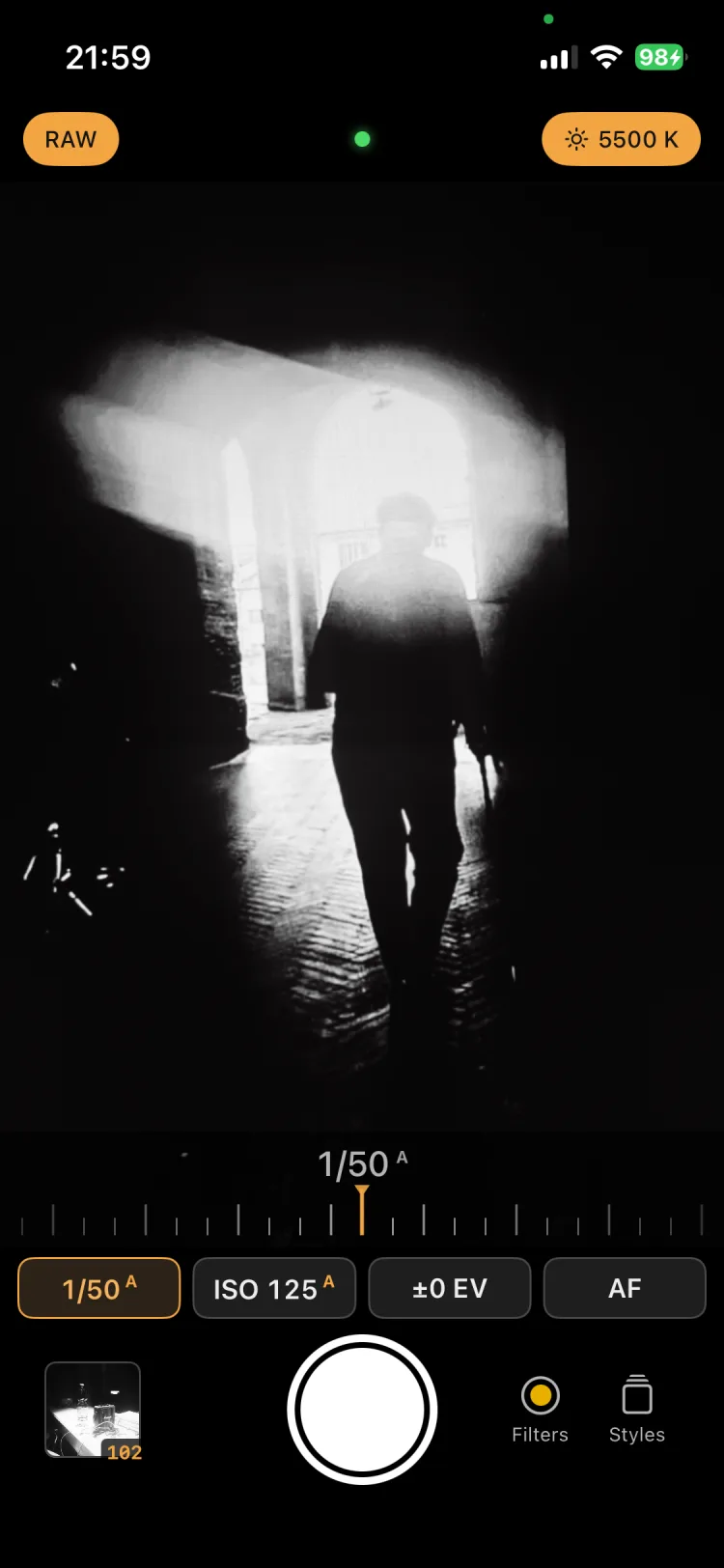
What is on the viewfinder screen, from top to bottom: RAW, the LED and daylight, the photograph with filters, styles and dial over it, the readouts, the shutter button.
The viewfinder screen has four bands, from top to bottom. You use it with one hand: everything you need while shooting is at the bottom, under your thumb. The photograph takes all the rest.
1. The top bar#
- RAW, on the left: when it is on (amber capsule) Procol also keeps the raw negative from the sensor. See RAW and daylight.
- In the centre a small LED: green when you can shoot, pulsing amber when Procol asks you to wait, off if the camera isn't ready. See Shooting.
- 5500 K, on the right, with the sun: fixed daylight, like a film. When it is off it becomes AWB ᴬ, the iPhone's automatic white balance.
Tap RAW and 5500 K to turn them on and off: when on they are amber.
2. The viewfinder#
The photograph, already printed with the chosen style. It takes all the space the controls leave free: on a tall iPhone it is narrower and longer than the sensor's 3:4, and the shot has the same edges (see The viewfinder). Here you tap for focus and metering, press and hold for colour, drag to zoom.
Over the photo, only when you call them, you get:
- at the top the filter squares, with the Filters button (Filters);
- at the bottom the style gallery, with the Styles button (Styles);
- at the bottom the dial, when you tap a readout (The dial).
When they are not needed they disappear, and the photograph is left clear.
3. The readouts#
Four buttons below the photo, just above the shutter button, tell you how the camera is exposing:
| Button | What it tells you | Example |
|---|---|---|
| shutter speed (Shutter speed) | the exposure time | 1/125, 1/15 ᴬ |
| ISO (Sensitivity) | the sensitivity | ISO 400, ISO 8000 ᴬ |
| EV (Compensation, in manual Light meter) | exposure compensation; in manual, the light meter | ±0 EV, +⅔ EV, ▸ ● ◂ |
| focus (Focus) | autofocus or manual focus | AF, MF with the scale |
The small amber ᴬ means automatic: the camera chooses the value. Tap a button to open its dial; the open button has an amber border and amber text. Press and hold it to set it back to automatic. The names in italics are the ones VoiceOver reads. The details are in Exposure and in Focus and zoom.
4. Shooting#
- On the left, the thumbnail of the latest print, with the frame counter: the number of the last frame on the roll. With an empty roll there is an S, as on the frame counter of film cameras before the first frame. Tap it to open the contact sheet.
- In the middle, the shutter button.
- On the right, two buttons: Filters, a ring with a dot in the colour of the filter in use, and Styles. A tap turns them on: they become amber and bring up the filter squares or the style gallery over the photo. Another tap turns them off and the photo is clear again. You can keep both on.
The dial#
Every value in Procol, when you shoot and when you print, is adjusted with the same tool: a dial as wide as the screen. In the viewfinder it appears at the bottom over the photo, on a dark band, when you tap a readout; if the style gallery is open, the dial takes its place until you close it.
- Drag horizontally: to the left the value goes up, to the right it goes down, like turning a real dial under your thumb. At each step you feel a small tap.
- Flick it with a quick gesture: for shutter speed, ISO and focus it carries on by itself for a few steps and slows down. A tap stops it.
- The amber triangular mark is the reference: for shutter speed and ISO, the value the light meter judges right; for compensation, zero; in the print, the style's value. When you pass it, the tap is sharper.
- The long marks fall on whole stops (1/125, 1/250, ISO 400, 800…).
- At the end of travel you feel a hard tap: you can't go further.
- A double tap on the dial goes back to automatic (or, in the print, to the style's value).
With VoiceOver the dial moves one step at a time, swiping up and down.